
Features
Speaking speed test: measure your words per minute as you read
A speaking speed test measures how many words per minute you actually say when you read a text aloud. LumiPrompter runs one every time you read: turn on Voice follow, read naturally, and the Last session report shows your real pace, reading time, pauses and how much you completed. One click then makes that pace your scrolling speed for the next take.
Last updated:
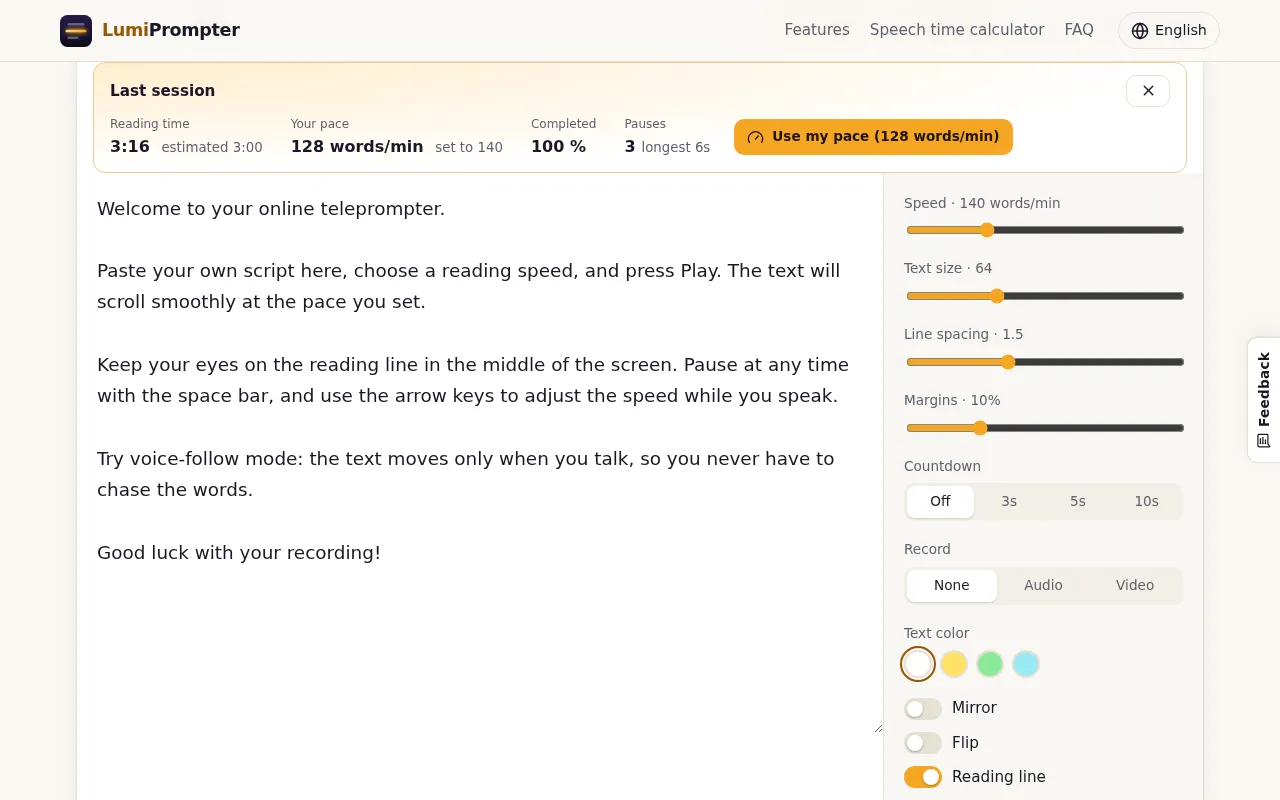
How does LumiPrompter measure your speaking pace?
When you press Stop, LumiPrompter divides the part of the script you covered by the time you spent reading it. If you read 60 % of a 300-word script in 1 minute 20 seconds, that is 180 words in 80 seconds: a pace of 135 words per minute.
Reading time counts only the time the prompter was playing. The countdown and every pause you make with Space, the Pause button or a clicker are left out, so a break does not drag your average down. Breaths and short silences between sentences stay in, as they would in a real speech.
- Only spoken words count: stage directions like
[SMILE]and//notes are not part of the script length. - Chinese and Japanese scripts are measured in characters per minute instead of words.
- A session with less than 5 seconds of reading produces no report.
Why test with Voice follow on rather than a fixed speed?
With Voice follow, the text moves only when your browser recognises your words, so the position in the script is set by your voice. The pace in the report is then genuinely yours. When you say the last word, the scrolling and the clock stop on their own.
With a fixed speed, the text scrolls at the speed you chose whether you keep up or not. The report then mostly reflects that scroll speed: it lands close to the “set to” value, a little lower if timed [PAUSE 3s] cues held the text, or at an average if you changed the speed with the arrow keys during the read. That is useful for timing a take, but it does not measure how fast you talk.
Voice follow works in Chrome and Edge on computers and Android, and in Safari on Mac, iPhone and iPad. Firefox does not support it.
No Voice follow in your browser? Read at a fixed speed and adjust it with ↑ and ↓ until the text stays comfortably on the reading line. The report then shows the average speed you settled on, a fair estimate of your pace.
How to take the speaking speed test, step by step
Use the script you actually plan to deliver if you have one: your pace depends on the text. The sample text works for a quick first try.
- Open the teleprompter and press Load sample text, or paste your own script. At least one minute of reading gives a steadier result.
- Below the editor, turn on Voice follow and choose the Speech language of your text.
- Press Play to open the prompter, then press Play again (or
Space). Allow microphone access when the browser asks. A 3-second countdown runs first by default. - Read aloud exactly as you would for your audience: same volume, same pauses. The text waits for you, so there is nothing to keep up with.
- Read to the end, or press Stop (
Esc) when you are done. Back in the editor, the Last session card shows your results. - If you read at least 30 % of the script and your pace differs from the current speed by more than 5 %, a Use my pace button appears. Click it to make your measured pace the reading speed for the next take.
What does each number in the report mean?
The Last session card sits above the editor until you dismiss it. Each line compares what happened with what you had planned.
| Report line | What it measures | How to read it |
|---|---|---|
| Reading time | Time with the text playing, pauses excluded | “estimated” is how long the whole script takes at the speed you had set |
| Your pace | Words (or characters) per minute over the part you read | “set to” is the speed when you pressed Play |
| Completed | How far through the script you got | Below 100 %, compare paces, not times: the estimate is for the full script |
| Pauses | Pauses longer than half a second, plus the longest one | Many long pauses show where you hesitate or lose your place |
A reading time well above the estimate with a pace below “set to” simply means you speak slower than your current setting. That is exactly what Use my pace corrects.
Am I talking too fast? Typical speaking rates
There is no single correct pace. The ranges below are general rules of thumb for English, not norms. LumiPrompter’s own presets are 110, 140 and 170 words per minute for slow, average and fast; for Chinese they are 180, 240 and 300 characters per minute, and for Japanese 250, 300 and 350.
Nerves usually speed people up, so if your rehearsal pace is already at the top of a range, aim a little lower for the real thing.
| Pace | How it sounds | Typical for |
|---|---|---|
| Under 110 wpm | Slow, very deliberate | Solemn speeches, difficult material, listeners in a second language |
| 110–130 wpm | Calm and clear | Keynotes, lectures, important announcements |
| 130–150 wpm | Comfortable, conversational | Presentations, YouTube videos, video calls |
| 150–170 wpm | Brisk | Audiobooks, podcasts, news reading |
| Over 170 wpm | Fast | Short energetic clips and ads; hard to follow in a long talk |
How can you slow down or speed up when you speak?
Once you know your pace, change one thing at a time and read again to compare. The script and the speed setting are the two levers.
- Build in breathing room: put
[PAUSE]after key points to stop a fixed-speed scroll until you resume, or[PAUSE 3s]for a timed hold. See how to format a teleprompter script. - Split long sentences into short lines and paragraphs: shorter phrases slow most readers down naturally.
- Let the prompter pace you: set a fixed speed 10 wpm below your measured pace and follow it. Each press of
↑or↓changes the speed by 10 wpm. More in how to set teleprompter speed. - To speed up, do the opposite, one step per take, until it still feels clear.
- Record a take and listen back: recording while you read shows rushed words and missing pauses better than any number.
Only the last session is kept. Write your pace down after each take if you want to track your progress.
How long will my speech take at my pace?
Divide the word count by your pace. A 700-word speech takes about 5 minutes 23 seconds at 130 wpm, and 4 minutes 40 seconds at 150 wpm.
The editor already shows the word count and the duration at the current speed, and Fit to duration sets the speed needed to finish in a given time. For estimates without a script, use the speech time calculator.
Is the speaking speed test private?
Yes. The report is calculated in your browser and saved only in its local storage on this device; nothing is sent to a server and there is no account. Only the last session is kept: a new read replaces it, and the Dismiss (×) button deletes it.
Voice follow uses your browser’s speech recognition, which runs on the device or through the browser vendor’s speech service depending on the browser (Google in Chrome, for example). LumiPrompter never records your voice unless you turn on recording, and recordings also stay on your device.
Frequently asked questions
- How can I test my speaking speed online for free?
- Open LumiPrompter, turn on Voice follow and read a script aloud. When you press Stop, the Last session report shows your pace in words per minute, with no account or download.
- What is a normal speaking rate in words per minute?
- Around 130 to 150 words per minute feels comfortable to most listeners in a talk or a video. Below about 110 sounds slow, and above about 170 is fast for a long speech. These are rules of thumb, not norms.
- How do I know if I talk too fast?
- If your measured pace is above about 170 words per minute for a speech, you are probably fast for most audiences. Record a take and listen back: rushed words and missing pauses are the usual signs.
- Why is my pace the same as my set speed?
- You probably read with a fixed speed, so the report measured the scrolling rather than your voice. Turn on Voice follow and read again to measure your real pace.
- Does the test work if I do not finish the script?
- Yes. Pace is calculated over the part you read, so stopping halfway still gives a valid number. The Use my pace button appears once you have read at least 30 percent of the script.
- Does it work for Chinese and Japanese?
- Yes. For Chinese and Japanese scripts, the report counts characters per minute instead of words, and both are among the Voice follow speech languages.