
Features
Teleprompter remote control: clickers, foot pedals and keyboard shortcuts
LumiPrompter works with any Bluetooth presentation clicker, USB or Bluetooth foot pedal and your keyboard, because these devices all send ordinary key presses that the teleprompter understands. Space plays and pauses, the arrow keys change the speed and scroll, and [ / ] jump between sections. No special remote, driver or app is needed. With Second screen, your laptop becomes the remote: the text runs on the other display and the main window shows only the controls.
Last updated:
Which keyboard shortcuts control the teleprompter?
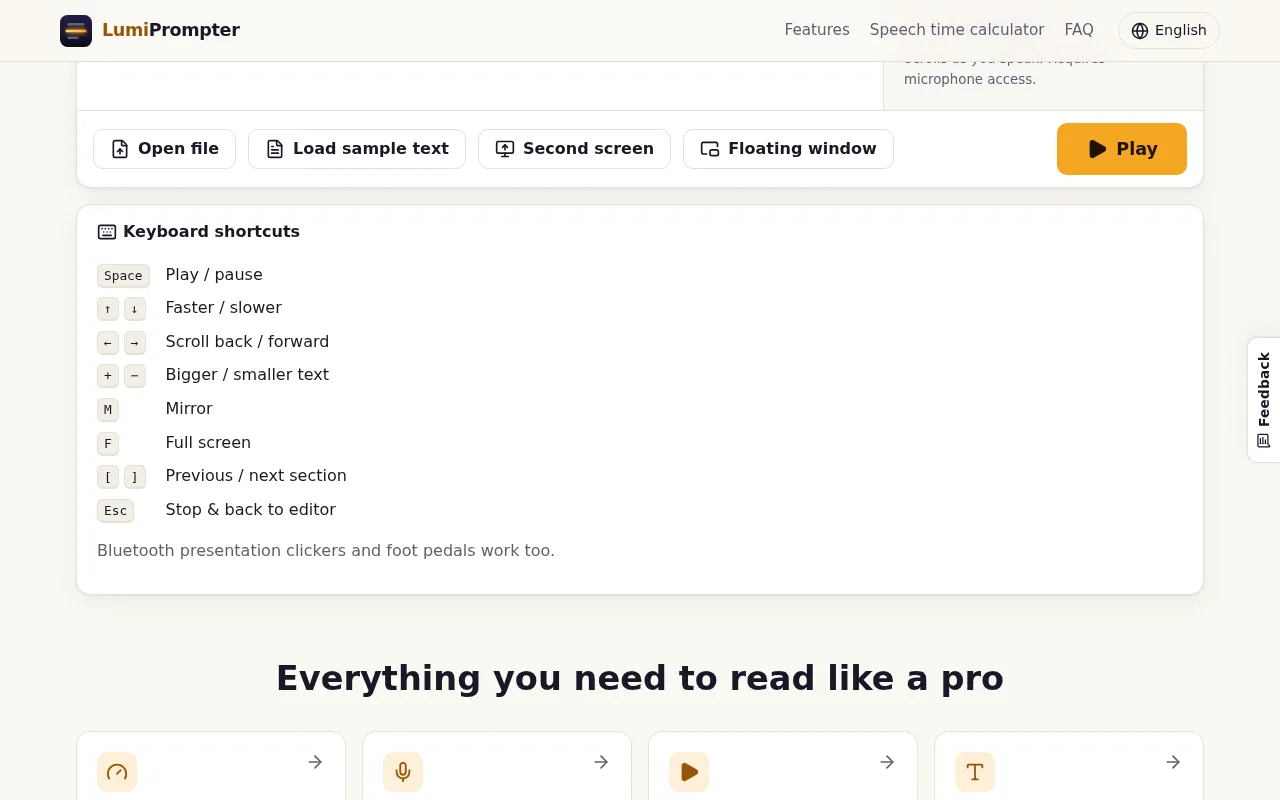
The shortcuts work as soon as the reading screen is open: press Play in the editor, or Ctrl + Enter (Cmd + Enter on a Mac) while typing in the script. The Keyboard shortcuts panel under the editor lists the main ones; the full set is below.
Several keys do the same job on purpose, so that the buttons of most clickers and pedals land on a useful action without any setup.
| Key | Action | Details |
|---|---|---|
Space, Enter, K | Play / pause | From the start, the countdown runs first; after a pause, reading resumes at once |
B, . | Play / pause | The “blank screen” button on many clickers sends one of these |
↑ / ↓ | Faster / slower | 10 words/min per press, from 40 to 400 |
← / PageUp | Scroll back | About 2 seconds of reading per press |
→ / PageDown | Scroll forward | About 2 seconds of reading per press |
[ / ] | Previous / next section | Sections are lines with --- in the script |
+ / - | Bigger / smaller text | 4 steps per press, from 20 to 160 |
M | Mirror | Flips the text left to right for teleprompter glass |
F | Full screen | Press again to leave full screen |
Home | Back to the start | Jumps to the first line without leaving the reading screen |
Esc | Stop & back to editor | In full screen, the first press only exits full screen |
Can I use a presentation clicker as a teleprompter remote?
Yes. A presentation clicker is a tiny wireless keyboard with three or four keys, so the teleprompter sees exactly the keys it sends. Most models send PageDown and PageUp for Next and Previous; some send the right and left arrows. Both scroll the text forward and back in LumiPrompter.
To pause, use the clicker’s “blank screen” button if it has one: it usually sends B or ., and both play and pause the teleprompter. A typical workflow is to set the speed in advance, start and pause with the blank-screen button, and nudge the text with Next and Previous when you get ahead or fall behind.
- Next →
PageDownor→→ scrolls forward about 2 seconds. - Previous →
PageUpor←→ scrolls back about 2 seconds. - Blank screen →
Bor.→ play / pause. - Start slideshow → usually
F5,Shift+F5orEsc→ avoid it:F5reloads the page andEscreturns to the editor.
Test every button of your clicker on the reading screen before you go on stage, and note which one pauses. Models differ, even from the same brand.
How do I connect a Bluetooth clicker or foot pedal?
Clickers and pedals connect like any keyboard, so the pairing happens in your system settings, not in the browser. Clickers that come with a USB receiver need no pairing at all: plug the receiver in and the clicker works.
- Put the clicker or pedal in pairing mode (often a long press on a button or a small switch; check its manual).
- On your computer or tablet, open the Bluetooth settings and pair it. It appears as a keyboard.
- Open LumiPrompter, paste your script and pick a Countdown in the settings.
- Press Play to open the reading screen.
- Press the clicker’s blank-screen button, or
Space, to start. The countdown runs, then the text scrolls. - Use Next and Previous to fine-tune your position, and press
Escwhen you are done.
Foot pedals usually ship sending PageUp and PageDown or the arrows. If yours comes with configuration software, set one pedal to Space (play / pause) and another to PageUp (scroll back), so you can recover from a stumble without using your hands.
How does the countdown work?
In the settings, Countdown offers Off, 3s, 5s and 10s; it is set to 3 seconds by default. The countdown runs each time you start from the top, including when you restart after reaching the end. Resuming after a pause is immediate, so a clicker press never makes you wait.
If you record with LumiPrompter, recording begins when the countdown ends, which leaves you a few clean seconds to settle. Choose 5s or 10s when you start the teleprompter from the keyboard and then need to sit back or put the clicker down. More on takes in recording while you read.
Can I use my laptop as a teleprompter remote while the text is on another screen?
Yes. Click Second screen and the text opens in a separate window for the external monitor, stage monitor or teleprompter display. As soon as that window connects, the main window turns into a remote control: the scrolling text disappears from the laptop, replaced by large buttons and a preview of the line being read. Both windows talk directly inside the browser on the same computer, with no server, no Wi-Fi pairing and no account.
This is the classic teleprompter operator setup: the speaker reads from the prompter screen while an operator, or the speaker, drives it from the laptop. Key presses still work in both windows, so a clicker works whichever window has focus; F in the display window makes that window full screen.
- Now reading: the current line and the next one, so the operator always knows where the speaker is
- Elapsed and remaining time, with a progress bar
- Play and pause, scroll back and forward, previous and next section
- Speed and text size buttons, Restart, Mirror and Flip
- Show the text here brings the scrolling text back to the laptop; the screen button in the control bar switches back to the remote
Closing the display window brings the text back to the main window automatically. Both windows must be open in the same browser: see floating window and second screen for the monitor setup.
How do I jump between sections of a script?
Put --- on its own line wherever a new part starts, for example between the intro, each topic and the call to action. On the reading screen, ] jumps to the next section and [ to the previous one, placing the start of the section on the reading line. The first stop is always the top of the script.
Section jumps work while playing or paused. If you turn on Flip for teleprompter glass, the arrows, page keys and section keys follow the flipped text, so “forward” still moves the way you see it. The other markup (pauses, stage directions, notes) is explained in how to format a teleprompter script.
For a video in several takes, program a pedal to send ]: one tap brings up the next part, ready to read.
Can I control a teleprompter hands-free?
Yes, with Voice follow. Instead of a fixed speed, the text moves as you speak and waits when you stop, so you need no remote at all. It works in Chrome, Edge and Safari; read voice-activated teleprompter for languages and tips.
You can still combine both: keep a clicker in your pocket to pause or scroll back while Voice follow drives the scrolling. With the mouse, a double-click on the text plays or pauses, and dragging or scrolling the wheel moves the text by hand.
Why doesn’t my clicker or keyboard work?
Almost every problem comes from focus or from a clicker that sends unexpected keys. Check these in order:
- Open the reading screen first. Shortcuts act on the reading screen, not on the editor.
- Give the teleprompter focus: click once inside the LumiPrompter window. If another app or browser tab is in front, it receives the key presses instead.
- Find out what your clicker sends: open a text editor and press each button. Arrows, Page Up/Down,
Band.all work; volume or media keys do not. - Try the clicker’s other mode. Many have a switch (for example PowerPoint and Keynote, or a media mode) that changes the keys they send.
- Turn off Caps Lock. The letter shortcuts (
K,B,M,F) respond to lowercase only;Space, arrows and page keys are not affected. - Wake the clicker up. Bluetooth clickers and pedals go to sleep after a while, so press a button once before you start.
What you need: a clicker or pedal
LumiPrompter reacts to keyboard keys, so a remote that behaves like a keyboard works with no extra software. When you choose one, check that it is described as a keyboard or HID device for your system, how it connects (USB receiver or Bluetooth) and which keys it sends; the table above shows what each key does.
- Presentation clickerWorks as soon as its USB receiver is plugged in. Next and Previous move the text, and a blank-screen key usually plays and pauses.See on Amazon
- Bluetooth page turnerSmall remotes sold for e-books and sheet music often pair with phones and tablets as a keyboard and send the arrows or Page Up / Page Down.See on Amazon
- Foot pedalLeaves both hands free. Models with configuration software let you set one pedal to Space (play / pause) and another to Page Up.See on Amazon
As an Amazon Associate, LumiPrompter earns from qualifying purchases. We don’t test or rank products: the examples show what to look for.
Frequently asked questions
- Can I use my laptop as a remote control for the teleprompter?
- Yes. Open Second screen: the text goes to the other display and the laptop window becomes a remote with play, pause, speed, text size, section jumps and a preview of the line being read. It runs on the same computer, with no app and no network setup.
- Can I use a Bluetooth remote with an online teleprompter?
- Yes. LumiPrompter reacts to the keys a Bluetooth clicker or foot pedal sends, so pairing it with your computer or tablet is enough. No app or driver is needed.
- What keys does a teleprompter remote send?
- Most presentation clickers send Page Down and Page Up, sometimes the arrow keys, plus B or a period for the blank-screen button. LumiPrompter scrolls with the first and plays or pauses with the others.
- How do I pause the teleprompter with a clicker?
- Press the blank-screen button, which usually sends B or a period. If your clicker has no such button, reprogram one key to send Space or use a foot pedal for pausing.
- Does a foot pedal work with LumiPrompter?
- Yes. USB and Bluetooth foot pedals act as keyboards. Set them to Space for play and pause, and to Page Up or Page Down to scroll back and forward.
- Can I use a clicker with a teleprompter on an iPad or Android tablet?
- Usually yes. Bluetooth clickers and pedals pair with tablets as keyboards. Models that need a USB receiver only work if the tablet has a suitable port.
- How do I change the teleprompter speed while reading?
- Press the up arrow to go faster and the down arrow to go slower, 10 words per minute per press. You can also use the speed buttons in the control bar.